
Showing posts with label godot resources. Show all posts
Showing posts with label godot resources. Show all posts
Wednesday, August 19, 2026
A New Tutorial Approaches -- Virtual Pet in Godot
I've started a new tutorial series!
A whole lot of the time I surf around the Internet -- ... okay, so I surf around the Godot feed on Bluesky. BUT, I do that, and I keep my ear to the ground to see what people are asking for and would like to learn. If I can't find a tutorial that I like, I make it, which is how we got to my new Virtual Pet tutorial. If you follow the tutorial strictly you'll wind up with something Tamagotchi adjacent, but you could absolutely spin it out to anything. (Someone asked me for Nintendogs ... codewise, this would make you Nintendogs. Your bigger fight is gonna be rendering lowpoly dogs in Blender, which I in this moment am not able to do.)
If you'd like to learn to learn to make a virtual pet with me, click here. New parts are released every Friday morning, so keep checking back!

Wednesday, July 8, 2026
Transparent Godot
I won't spoil it, but I'm working on a tutorial you'll see later in the year, and the final trick is to get the game to run transparently on the desktop, like the game is sitting there. So, howmst?
I FELL DOWN A RABBIT HOLE solving this problem! The best explanation I found is here:
Honestly, GOATed, very simple and clear. It's mostly a few settings. But what if you want to click through? NAD LABS has another tutorial, click here, where he gets that working using some Polygon2D nodes, but I couldn't get it.
I dug around forever, and finally tripped over this in the Godot docs: Click here to read about mouse pass through
Long story short, the polygon method works great on Linux and Mac, but not Windows, which I'm currently on. Barf.
You CAN get it working in Windows! Look at this reddit post.
Howmstever, the Windows solution:
- Does not work in Linux or Mac
- Is in C#, which is an absolute puke of a language, all my homies hate C#.
- Yes I used to use Unity, how did you know
So if you're making a game, are you expected to have a Windows version and a Linux/Mac version? Honestly, yes. That wouldn't be super weird.
... maybe I'll stick to making web games.
Wednesday, December 3, 2025
I Don't Get It Either!
I had an issue, I solved it, and I have no idea why my solution works. I also don't know why my old solution didn't work. This sort of thing makes me cranky, so I'm hoping someone else understands it and explains it to me!


Makealotl Music is getting a new game with a lilipad piano. I wanted to include a mode where you play Simon Says with Delia to learn some of the songs in the program. You can see the final version working here:
An oversimplification of what's going on under the hood is that the game stores the song in several different arrays, and then as you progress through the song, it glues the arrays together to build what Delia "listens" for to check if you're wrong or right. Originally I had the arrays stashed on the button itself that you click to pick a song. So, for example, the Mary Had A Little Lamb would store C D E D in an array, and then the game would load C D E D and see if that's what you were playing. You can read the code here in this Pastebin if you want the technical-atude of it all.
This worked great until I added a second button to add a second song. (Brother John, if you were curious.) Once I did that, Godot would not read any array at all, and would crash with a null reference error. (Are those called null reference errors in GDScript? That's what they're called in C#, I've never heard them called anything in GDScript.) I cannot explain why the code would work fine with one object and go south with two objects.
I got to a point where whatever the explanation was wasn't important, I needed the code to work. I got the idea to:
- Have ONE object, just a regular ol node, run the code that lets Delia check what notes the user plays
- Store all these arrays in a resource
- Have the button send the resource up to the regular ol node and force it to read the arrays out that way. Tell me it's null now, you sonofabitch.
Godot 4.5 have a feature that I have been vibrating for. See that fancy "append node" checkbox? A signaling node can now send itself up with a signal! So we can store the resource on the button, have the button signal up, send the button on that signal, then read the resource!
Wow! Except it doesn't work!
If that song_data variable is null then I'm in Unity Engine. No. For whatever reason Godot simply would not read the resource off the button. Notice that the button itself isn't null? I guess it did manage to send itself, but none of its own data?????
Google suggested that sometimes you had to read the resource, duplicate it, then send it up. This doesn't work either.
So, like, don't do that, I guess, or suggest it.
Godot really loves the load() and preload() functions, those are pretty secure, so I tried this on the button:
Which doesn't work, but it lead me to the working solution. I don't love this solution, it's not slick and clean, but it's the only thing that actually works and allows the game to run multiple songs so let's goooo:
Using the connect dialog, send the resource's path as a string.
Then force the Teach Me object to load the path.
So I got this far, I got this working, party party, and then I remembered that I totally forgot that .bind() exists. Oh well, I can't promise that it would work, given that append node wasn't working.
Again, this makes me cranky, I'd rather just merrily be putting .tres files in the inspector by drag and drop. I'd love to know why the other solutions didn't work, and I'm curious to know if any of these will actually work in the upcoming 4.6. If you can explain it, let me know!
Wednesday, November 26, 2025
Dialogic Alternative Styles -- I Had No Clue!
I'll tell the full story in my visual novel tutorial, but I had someone ask me about a feature that, as I played with it, I really felt should be in Dialogic properly. So when I asked, they're like, no, those features exist, here, take this:
Wednesday, June 18, 2025
The For Loop in GDScript (Or: Why I'm Gonna Hit Someone)
So I can write a for loop in other languages. I am aware that this makes me a member of an exclusive club called Everybody. But, like, look! See?

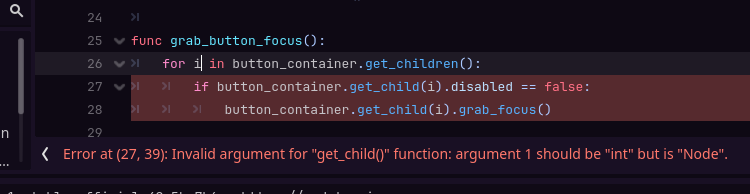

As you can tell from that thick, luscious error message, that ain't it chief. Sooooo, maybe:
But I don't want it to be a node. I want it to be an int. Apparently in GDScript, if you're writing a for loop, the for (variable) is always gonna be a node. Always and forever.
I didn't get a screenshot, but apparently the right answer is:
for i in button_container.get_children():

    if i.disabled == false:

  i.grab_focus()
But like with tabs that Blogger doesn't eat.
So of course, I immediately stepped on a rake and NEEDED i to be typed. Do you know how to do it?
Other sane languages would let you do i : whatever, but gdscript, you're typing that bad boy inside the loop.
Thanks! I hate it!
Wednesday, April 16, 2025
Please Laugh
I was working on a request for my board game tutorial, where a user wanted the piece to be able to bounce back if it hit the end and still had some roll left. You all, when I tell you I worked for four days solid to try and figure out why the piece was moving where it was moving!
First, it made me realize that I need to do an episode where I talk about the Godot debugger. 🤔 But the debugger wasn't actually being helpful in answering the questions I had.
Second, I wound up writing this absolutely spectacular slop:
 So, this is kinda nonsense. I'm showing you because I'm hoping it helps. I know that print statements aren't excellent debugging practice, but I actually got the answer doing this, and also???? Print statements can be deleted, it's not that serious.
Wednesday, April 9, 2025
Warp Zine Issue 0
Y'all! The Kentucky Game Developers published their own zine! You can read the first issue right here on Itch.io! I'm so proud of them.

Then they asked me to submit to the second issue, and help edit it too, and I'm like hol up becaue I'm only so smart 😵💫
But we did it, and you can see the next issue right here
This is what I made, I made a Godot tutorial (you can guess why they asked me, Queen Princess of Open Source,). Since it's a zine I wanted it to have that sick zine aesthetic, so I typed everything out, then cut and paste it up. Zine making takes more glue than I thought it would.

Wednesday, March 5, 2025
Programming: Comparing Values
I was looking up the differences between Python and Godot earlier last week, and they're actually pretty different languages.
Then, while writing my new tutorial, I ran face first into a problem that was easily solvable in Python, not so much in GDScript.
So how do you compare three values and come up with the highest variable? To be clear, if I've got:
  a = 1
  b = 2
  c = 3
I can call var whatever = max(A, B, C) and Godot will spit out 3. I don't want it to spit out 3. I want it to tell me C is the highest.
My friend was like oh just use a dictionary and I straight out died and was dead, I hate dictionaries. I don't know another way to solve them.
So apparently this will work in Python:
highest_value = max(dictionary, key = dictionary.get)
dictionary = {
"a" : 1
"b" : 2
"c" : 3
}
print(highest_value)
Hey, in Python, you don't need the var keyword!
GDScript will not do that, it doesn't like having functions in max(). Or at least 4.3 doesn't, maybe by the time you read this the fancy new version of Godot will be fine with it.
A lot of solutions I was finding involve iterating over a loop, which, like, cool, we love loops, but I got it in less lines of code, and we all know shorter is better. Here's the GDScript solution:
#talk to the values part of the dictionary, get the highest value
dictionary = {
"a" : 1
"b" : 2
"c" : 3
}
var highest_value = dictionary.values().max()
#now go back in and get the key
var this_is_the_key = dictionary.find_key(highest_value)
#prove i'm right ~
print(this_is_the_key)
It should spit out C. This is great for comparing scores and finding the winner, which is what I used it for!
Wednesday, February 12, 2025
Menus and Accessibility
For one of my projects, several testers asked for keyboard controls in my menus.
Which, fair, I'd been using a mouse to test but I can see where keyboard would
be easiest. This is the easiest video that I've ever found on using keyboard
controls to navigate menus in Godot, it's very no nonsense and works out of the
box quickly:
See why I love it? I've thought about expanding this tutorial out to make it
more accessible. I'm not really sure where the line is between "I jacked this
guy's tutorial" and "Wow my own original content," but we're all just nerds
typing @export var junk at the end of the day. Here's what I think I'd add in
terms of accessibility:
- Dots or icons so you can see what's selected
- Sounds, a cute lil beep when something comes into focus
- Showing how theme interacts with focus
- Rumble. Okay maybe not, but that would be kinda fun, wouldn't it?
Subscribe to:
Posts (Atom)